



Google Ads Budget Panel: What’s New for Performance Max and Demand Gen?
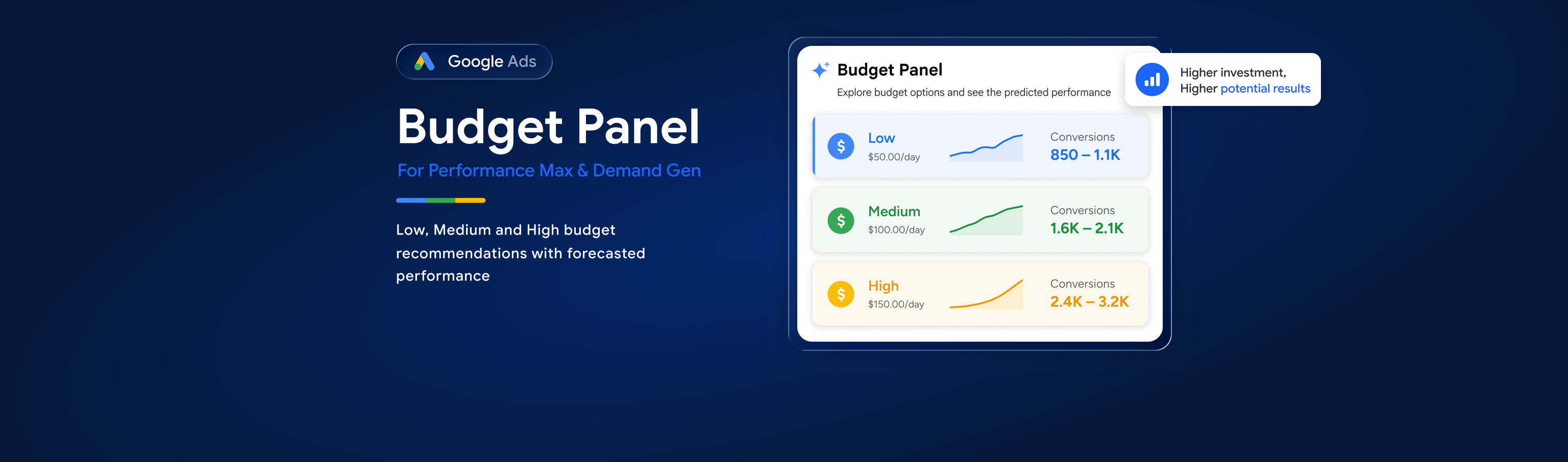
Google Ads has introduced a new Budget Panel for Performance Max and Demand Gen campaigns. It provides Low, Medium and High budget recommendations with predicted performance outcomes. Advertisers should compare these forecasts with ROAS, CPA, margins and wider business goals. The update shows Google’s growing use of AI to support smarter campaign decisions.
17 Aug, 2026
Google Ads has introduced a dedicated Budget Panel within the campaign creation and review experience for Performance Max and Demand Gen campaigns, providing advertisers with customised budget recommendations alongside forecasted performance.
At first glance, this may sound like an entirely new Google Ads budgeting feature.
However, budget recommendations and performance forecasting have existed within Google Ads for years.
So, what has actually changed?
The important development isn't that Google can recommend a budget. It's how Google is bringing budget recommendations and predicted outcomes together within the campaign setup workflow, helping advertisers understand the potential impact of different investment levels before launching a campaign.
In short: the Google Ads Budget Panel gives Performance Max and Demand Gen advertisers up to three suggested daily budget levels, Low, Medium and High, alongside forecasts showing how different levels of investment could affect performance or reach.
Here's what advertisers need to know.
What Is the Google Ads Budget Panel?
The Google Ads Budget Panel is a decision-support feature integrated into the campaign review experience.
Google analyses factors including the campaign's:
-
Bidding strategy
-
Targeting
-
Campaign settings
-
Available opportunity
It can then present advertisers with up to three suggested daily budget levels:
Low → Medium → High
Alongside these options, Google provides forecasts designed to show how different budget levels could influence campaign performance or reach.
Instead of simply entering a daily budget, advertisers can therefore compare Google's suggested investment levels before launching the campaign.
Is the Google Ads Budget Panel Actually New?
The panel is new. The concept isn't.
Google Ads has provided budget-related guidance in several forms for years.
Advertisers may already be familiar with:
-
Recommended daily budgets
-
"Limited by budget" notifications
-
Budget recommendations
-
Campaign simulators
-
Performance Planner
-
Forecasted results when adjusting campaign settings
-
Recommendations to increase campaign budgets
The Budget Panel should therefore be viewed as an evolution of Google's existing forecasting and recommendation capabilities, rather than an entirely new approach to budgeting.
What's different is that these insights are being surfaced more directly within the campaign creation and review workflow.
Which Google Ads Campaign Types Are Included?
Google's current documentation describes the Budget Panel within the setup experience for:
-
Performance Max
-
Demand Gen
The recommendations are customised according to the campaign configuration rather than using a single standard budget recommendation across advertisers.
How Do the Low, Medium and High Budget Recommendations Work?
Google can provide up to three recommended budget options.
Low: This represents the minimum daily budget Google recommends based on the campaign configuration.
Medium: A higher investment level intended to capture additional available opportunities.
High: A larger daily budget designed to take advantage of more of the potential reach or performance opportunity identified by Google's systems.
Advertisers can compare the predicted results associated with these options before deciding how much they're prepared to invest.
Importantly, these are recommendations, not requirements.
Why Is Google Introducing the Budget Panel?
The update fits into a much broader change taking place across Google Ads.
Google increasingly provides advertisers with predicted outcomes before they make campaign decisions.
Rather than simply recommending an action, Google is attempting to show what its models believe could happen if the advertiser takes that action.
For example: Budget Panel
"If you invest at this level, here's the opportunity we predict."
Similarly, other recent Google Ads developments are beginning to provide predictive guidance around optimisation decisions.
One example is Google's introduction of Performance Max negative keyword impact prediction, which gives advertisers more insight into the potential effect of optimisation decisions before applying them. This sits alongside Google's wider shift towards automation, including developments such as the Local Services Ads to Performance Max migration.
This represents a gradual move towards a Google Ads experience where AI doesn't simply automate campaigns. It increasingly helps advertisers evaluate decisions before implementing them.
What Are the Benefits of the Google Ads Budget Panel for Advertisers?
The Budget Panel could make campaign planning easier, particularly during campaign creation.
Faster Budget Planning
Advertisers immediately receive a reference point rather than choosing a budget without any platform guidance.
Forecasting Before Launch
Seeing potential outcomes alongside different investment levels can help advertisers understand whether additional budget could unlock meaningful opportunity.
Easier Scenario Comparison
Low, Medium and High recommendations make it easier to compare different investment scenarios.
Better Client Conversations
For agencies, forecasts can provide additional context when discussing budget requirements or growth opportunities with clients.
However, they should always be presented as Google's forecasts rather than guaranteed outcomes.
The Important Limitation: Google's Recommended Budget Isn't Necessarily Your Best Budget
This is where advertisers need to be careful.
Google can estimate available advertising opportunities.
It doesn't determine whether capturing that opportunity makes commercial sense for a particular business.
A higher recommended budget may potentially generate:
-
More traffic
-
More conversions
-
Greater conversion value
-
Additional reach
But that doesn't automatically mean it will generate more profitable growth.
Advertisers still need to consider:
-
ROAS
-
CPA
-
Profit margins
-
Product margins
-
Stock availability
-
Customer lifetime value
-
Cash flow
-
Seasonality
-
Promotional periods
-
Business growth targets
The question shouldn't simply be:
"How much more could we generate?"
It should also be:
"Would that additional growth be profitable?"
Example: When the Highest Google Ads Budget Isn't the Best Choice
Imagine Google presents three daily budget options:
Low: £100/day
Medium: £200/day
High: £350/day
The High recommendation may show the greatest predicted conversion volume.
That doesn't automatically make £350 the correct budget.
If moving from £200 to £350 significantly increases CPA or pushes ROAS below the client's profitability threshold, the Medium option may actually represent the better commercial decision.
Similarly, a retailer with limited stock may have little reason to aggressively increase spend even when Google identifies additional demand.
More opportunity doesn't always mean better business performance.
Google Ads Budget Forecasts Are Predictions, Not Guarantees
As with any Google Ads forecast, advertisers should remember that Budget Panel projections are estimates.
Actual campaign performance can be affected by factors including:
-
Competitor activity
-
Changes in demand
-
Seasonality
-
Conversion rate fluctuations
-
Product availability
-
Promotional activity
-
Website performance
-
Changes in bidding behaviour
The forecasts should therefore be treated as decision-support data, not guaranteed performance.
What Does the Google Ads Budget Panel Mean for Agencies?
For agencies, the Budget Panel could become a useful planning tool.
It can help teams:
-
Assess Google's view of available opportunity
-
Compare different investment scenarios
-
Support client budget conversations
-
Identify campaigns that may have room to scale
-
Understand potential performance implications before launch
However, agencies should avoid presenting Google's highest recommendation as the amount a client should spend.
The better conversation is:
Google identifies the opportunity → Agency evaluates the economics → Client makes the investment decision
That keeps commercial strategy at the centre of campaign planning.
A Better Framework for Evaluating Google's Budget Recommendations
Rather than automatically accepting Google's suggested budget, advertisers can use a simple framework:
1. Review the Opportunity
Understand what additional performance Google predicts.
2. Check Current Economics
Review CPA, ROAS, margins and profitability.
3. Consider Business Constraints
Check inventory, cash flow, seasonality and growth objectives.
4. Evaluate the Forecast
Compare Low, Medium and High scenarios.
5. Make the Business Decision
Choose the budget that makes sense commercially, not simply the highest amount Google recommends.
6. Monitor Actual Performance
Compare real-world results against the forecast and adjust accordingly.
What Should Advertisers Do?
There is no urgent action required simply because the Budget Panel has appeared.
Instead, advertisers should use it as an additional source of information when:
-
Creating new Performance Max campaigns
-
Creating Demand Gen campaigns
-
Planning campaign budgets
-
Assessing opportunities to scale
-
Discussing additional investment with clients
Most importantly, continue validating Google's recommendations against actual business performance.
Key Takeaways
|
Topic |
What You Need to Know |
|
Feature |
Google Ads Budget Panel |
|
Campaigns |
Performance Max and Demand Gen |
|
Recommendations |
Up to three suggested daily budgets |
|
Options |
Low, Medium and High |
|
Additional insight |
Forecasted performance/reach |
|
Are budget recommendations new? |
No |
|
What's new? |
Dedicated recommendations and forecasts integrated into the campaign review experience |
|
Should you automatically accept Google's recommendation? |
No |
|
Best approach |
Combine Google's forecast with profitability and business objectives |
ShoppingIQ Recommendation
The Google Ads Budget Panel is a useful addition, but it shouldn't replace strategic budget planning.
Our recommended approach is:
Google's Forecast → Performance Data → Business Economics → Advertiser Decision
Use the Budget Panel to understand the opportunity Google believes exists.
Then decide whether that opportunity is actually worth investing in.
For agencies in particular, the panel can provide useful supporting data for budget conversations, but recommendations should always be validated against the client's profitability targets and wider commercial objectives.
For retailers running Shopping campaigns, campaign performance also depends heavily on the quality, accuracy and optimisation of the underlying product data.
Want to improve the data powering your Shopping campaigns? Explore ShoppingIQ's Google Shopping Ads feed management service to optimise your product feed and improve campaign performance.
Final Thoughts
Google's Budget Panel isn't revolutionary because budget recommendations themselves aren't new.
What is more interesting is where Google is taking the experience.
Google Ads is increasingly moving beyond simply automating campaigns and towards predicting the consequences of advertiser decisions.
The Budget Panel asks:
"What could happen if you spend more?"
Other predictive tools increasingly ask:
"What could happen if you change this setting?"
That suggests the next phase of Google Ads may not simply be about greater automation.
It may be about AI helping advertisers evaluate decisions before they make them.
And that's potentially much more significant than the Budget Panel itself.