



How Many Product Images Can You Add to a Google Merchant Center Feed?
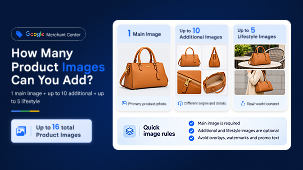
You can submit up to 11 standard product images in Google Merchant Center: one main image using [image_link] and up to 10 additional images using [additional_image_link]. Google also supports a separate optional [lifestyle_image_link] attribute for up to five lifestyle images. That means you can submit up to 16 product images in total across these three attributes. These limits apply to the attributes, not to how many pictures Google will show shoppers at once.
What Are the Different Google Merchant Center Image Attributes?

Illustration: one primary image, additional product views and separate lifestyle imagery.
The main image is the primary product photograph. Additional images can show different angles, close-up details, packaging or the item in use. Lifestyle images show the product in a real-world setting, such as a jacket being worn or a sofa in a living room. All three attributes use image URLs in the product data, rather than uploading a collage into a single field.
Do You Need All 11 Google Shopping Product Images?
No. The main image is required; additional and lifestyle images are optional. But more useful views can help shoppers understand a product before clicking. Including several relevant additional images is recommended where practical. For a pair of trainers, for example, consider a clear front or three-quarter view, side and sole views, a close-up of materials and an image showing the shoes being worn.
What Are the Google Merchant Center Image Requirements?
-
Use sharp, accurate images of the exact product and variant, with publicly accessible, stable image URLs.
-
Avoid promotional text, price labels, watermarks, borders and other overlays on product imagery.
-
Use supported formats such as JPEG, PNG or WebP; avoid blurry thumbnails and artificially enlarged images.
-
Aim for 1,500 × 1,500 pixels or higher where possible, while respecting Google's file and dimension limits.
How Will Google Merchant Center Image Size Requirements Change in 2027?
Google is increasing the minimum resolution for [image_link] and [additional_image_link] to 500 × 500 pixels across product categories from 31 January 2027. Merchant Center has already begun warning about images that fall below the upcoming requirement, with enforcement starting on that date. Google may automatically optimise some smaller images to meet the new requirements and prevent product disapproval.
The separate lifestyle-image attribute has its own image specifications, including a minimum of 600 × 600 pixels. Check the current Google Merchant Center image requirements before preparing new assets.
How to Find and Fix Google Merchant Center Image Errors
Open Products → Needs attention and review image-related warnings or disapprovals. Common causes include inaccessible URLs, unsupported image formats, small images and promotional overlays. Check the affected product's image links and correct the source feed or product data; allow time for Google to recrawl the updated images.
A quick check before submitting
Is the main image clear and accurate? Do additional images show something genuinely useful? Are the URLs accessible and the dimensions suitable? Does each variant show the correct colour or design?
At ShoppingIQ, reviewing image coverage and feed diagnostics together through effective product feed management helps identify products that could benefit from stronger visual information.
Official Google references:
-
Additional Image Link [additional_image_link] – Google Merchant Center Help
-
Lifestyle Image Link [lifestyle_image_link] – Google Merchant Center Help
FAQ's
1. How Many Images Can You Upload to Google Merchant Center?
Google Merchant Center supports up to 16 images per product across three attributes: one main image, up to 10 additional images and up to five lifestyle images. However, Google does not guarantee that all submitted images will appear to shoppers.
2. Are Additional Product Images Required for Google Shopping?
No. Only the main product image [image_link] is required. Additional images [additional_image_link] and lifestyle images [lifestyle_image_link] are optional but can help shoppers better understand a product by showing different angles, details and real-world use.
3. What Is the Minimum Image Size for Google Merchant Center?
From 31 January 2027, main and additional product images must be at least 500 × 500 pixels. Google recommends images around 1,500 × 1,500 pixels or higher for better performance across listing formats. Lifestyle images have a separate minimum resolution of 600 × 600 pixels.
4. Which Image Formats Does Google Merchant Center Support?
Google Merchant Center supports JPEG, PNG, WebP, GIF, BMP and TIFF image formats. Product images should be clear, accurate and accessible through valid image URLs, with file extensions matching the image format.
5. Why Are My Product Images Disapproved in Google Merchant Center?
Common reasons include inaccessible image URLs, unsupported formats, insufficient resolution, promotional overlays, watermarks or images that do not accurately represent the product. Review the affected items in Merchant Center's Needs attention section and correct the image or feed data.









No comments yet.