


What Is an MPN in Google Merchant Center, and When Should You Use It?
An MPN (Manufacturer Part Number) is a code assigned by a manufacturer to identify a particular product. An MPN in Google Merchant Center helps identify products accurately using manufacturer-assigned information. The [mpn] attribute is required for products without a manufacturer-assigned GTIN, unless the product has no clearly associated MPN or is custom-made. If the manufacturer has assigned an MPN, use that exact value rather than guessing one.
13 Nov, 2026
Why does an MPN matter?
An MPN helps Google distinguish products from the same manufacturer, especially when a GTIN is unavailable. Alongside other Google Merchant Center product identifiers, it helps Google understand which specific product is being sold. Some shoppers also search by part number, particularly for electronics, accessories and replacement parts. Supplying accurate identifiers can help Google match your listing to relevant searches.
Where can you find an MPN?
Check the product packaging, manufacturer specification sheet or official product page. Suppliers may also provide it in their catalogue. For a product with several versions, check that the part number belongs to the exact model, colour or configuration you sell.

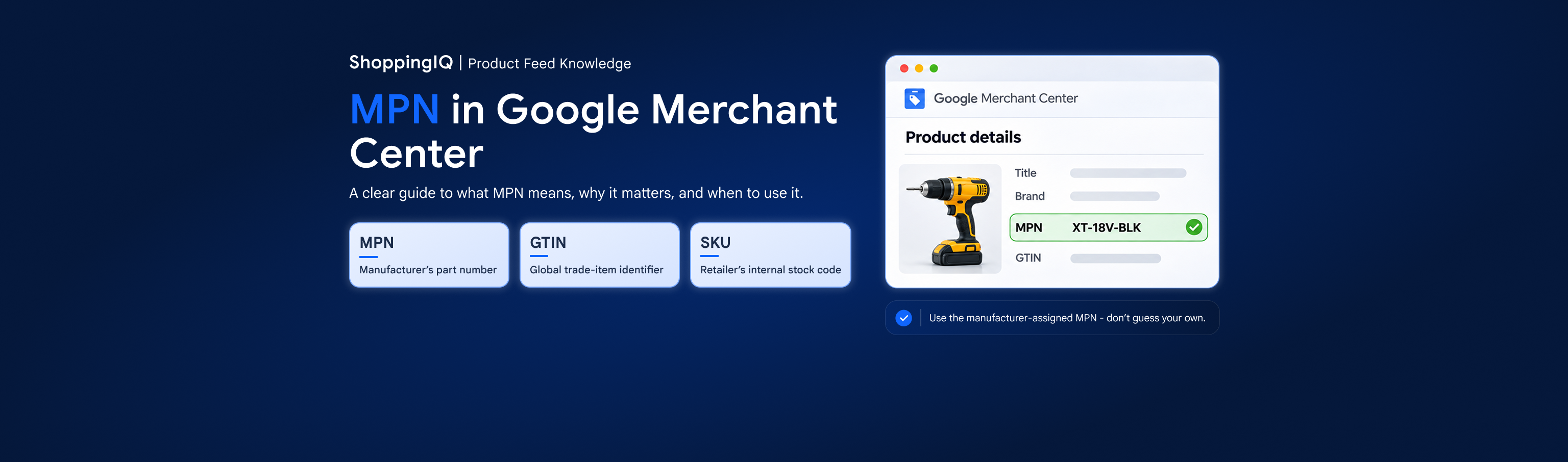
Illustration: example product details with the MPN field highlighted. Interface layouts may differ.
MPN vs GTIN vs SKU: what is the difference?
|
Identifier |
Who assigns it? |
What it is used for |
|
MPN |
Manufacturer |
Identifies a product within the manufacturer’s range |
|
GTIN |
GS1-based numbering system / brand owner |
Global trade-item identifier, often shown as a barcode |
|
SKU |
Retailer or merchant |
Internal stock and inventory tracking |
When should you submit an MPN?
Under Google Merchant Center MPN requirements, if the product has a manufacturer-assigned GTIN, submit the GTIN and include its MPN when available. If no GTIN was assigned, provide the manufacturer’s MPN and brand where available. Google permits up to 70 characters in the [mpn] field. Do not substitute your own stock code for a manufacturer-assigned part number.
What if there is no MPN?
Some handmade, customised or one-of-a-kind products do not have an MPN. Leave [mpn] blank if none was assigned. If no unique product identifiers exist, use [identifier_exists] = no as appropriate. There is an important exception: if you are the manufacturer and sole seller of your own product, Google allows a unique identifier of your choice, such as your SKU, as its MPN. This does not apply to reselling another manufacturer’s products.
How do you check MPN problems in the Merchant Center?
In the Merchant Center, open Products > Needs attention and look for an incorrect MPN or product-identifier issue. For missing MPN issues in Google Merchant Center, review the affected item and compare the submitted MPN and brand with the manufacturer’s data. Correct the original data source and check the issue again after Google processes the update.

Illustration: the type of MPN issue to investigate in Merchant Center; not a captured Google account screen.
A quick check before submitting
Is the MPN from the manufacturer? Does it match the correct product and variant? Is the brand accurate? If there is no MPN, have you avoided inventing one or reusing an unrelated SKU?
At ShoppingIQ, effective Google Merchant Center feed management includes reviewing manufacturer identifiers and identifying product-data errors before they affect listings.
About unique product identifiers
FAQ’s
1. What is an MPN in Google Merchant Center, and why is it important?
An MPN (Manufacturer Part Number) is a unique code assigned by a manufacturer to identify a specific product. In Google Merchant Center, the MPN helps Google recognise products accurately, particularly when a GTIN is unavailable. Providing the correct MPN can improve product identification and help Google match listings with relevant searches.
2. Is an MPN required in Google Merchant Center if a product has a GTIN?
If a product has a manufacturer-assigned GTIN, you should submit the GTIN and include the MPN when available. If no GTIN was assigned, Google generally requires the manufacturer's MPN when one exists. Always use accurate identifiers rather than creating your own values.
3. Where can I find the correct MPN for my product?
You can usually find the MPN on the product packaging, manufacturer's official website, product specification sheet or supplier catalogue. Make sure the MPN matches the exact product model and variant you are selling, as different configurations may have different manufacturer part numbers.
4. Can I use my SKU as an MPN in Google Merchant Center?
Generally, no. An SKU is an internal stock code assigned by a retailer, while an MPN is assigned by the manufacturer. However, if you manufacture and exclusively sell your own products, Google permits you to use a unique identifier of your choice, such as your SKU, as the MPN.
5. What should I do if my product has no MPN or Google reports a missing MPN?
If the manufacturer has not assigned an MPN, do not invent one. When no applicable unique product identifiers exist, you may use [identifier_exists] = no. If Google reports a missing MPN, check the affected product under Products > Needs attention, verify the manufacturer's information and correct the original product data source where necessary.
Enjoyed this article?
Like it, share it with your network, or ask us a question below.
Have a question?
Ask our team anything about this topic. Your question will be visible to everyone.
Questions & Discussion (0)