



Google Daily Budget Pacing Update: What Retailers Need to Know
Google’s Daily Budget Pacing update, which rolled out on June 1, 2026, changed how budgets are spent when Ad Scheduling is enabled. Although monthly billing limits and daily budget caps remained unchanged, Google began spending budgets more aggressively during active hours and days to maximize the monthly allowance. As a result, campaigns with restricted schedules could see faster and more concentrated spending, making it important for advertisers to review budgets and closely monitor performance.
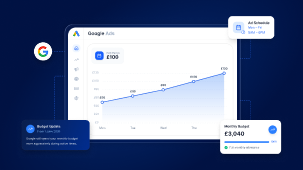
Google’s Daily Budget Pacing update, which started rolling out from 1 June 2026, changed how campaign budgets were spent when Ad Scheduling was enabled. While monthly billing limits and daily budget caps remained unchanged, Google began working harder to spend the full monthly budget allowance during active hours and days. This meant campaigns limited to specific schedules—such as weekdays, business hours, or weekends-only exclusions—could experience faster and more concentrated spending. Retailers and advertisers were advised to review budget settings, monitor CPA and ROAS closely, and ensure Ad Scheduling was not being relied upon as a primary method of controlling monthly spend.
What Changed?
From 1 June 2026, Google changed how it spent campaign budgets when Ad Scheduling was being used.
Previously, if a campaign ran only on certain days or hours (for example, Monday–Friday or business hours only), Google often naturally spent less than the full monthly budget.
Following the update, Google began trying much harder to spend the full monthly budget allowance, even when campaigns were active only during limited days or hours.
What Did This Mean in Simple Terms?
If a campaign had:
-
A £100 daily budget
-
Ads running Monday–Friday only
Previously, Google might have spent around £2,200 per month because the campaign was not active every day.
After the update, Google started attempting to spend closer to the full monthly allowance of approximately £3,040, meaning spend could become significantly more aggressive on the days the campaign was active.
What Did NOT Change?
-
Monthly billing limits remained the same.
-
Daily overspend limits remained unchanged.
-
Ads still showed only during the scheduled days and times.
-
Google did not automatically increase budgets.
The primary change was how aggressively Google attempted to spend the available budget during active periods.
Which Accounts Required Attention?
This update was most relevant for:
-
Shopping campaigns with weekends disabled..
-
Performance Max (PMax) campaigns using ad schedules.
-
Lead generation accounts running only during business hours.
-
B2B accounts running Monday - Friday only.
-
Any account using ad schedules to control spend.
Accounts already running 24/7 were unlikely to experience significant changes.
What should we do?
-
Reviewed all campaigns using Ad Scheduling.
-
Identified accounts where schedules were being used to control spend.
-
Checked whether current daily budgets were still appropriate.
-
Closely monitored spend, CPA, ROAS, and impression share during the first few weeks after rollout.
-
Informed clients that spend could become more concentrated on active days, even though monthly budget limits remained unchanged.
Key Takeaway
Google did not increase the total amount advertisers could spend overall.
However, campaigns with restricted schedules could spend their budgets much faster during active hours or days. Any account using Ad Scheduling as a way to control monthly spend should have been reviewed before and after the update to ensure budget performance remained aligned with business goals.
As Google Ads costs continue to climb in 2026, it’s more important than ever to align your daily budget pacing with CPC strategies - learn how to manage rising costs here








No comments yet.